HumanEI Studio
Digital Curb Cut
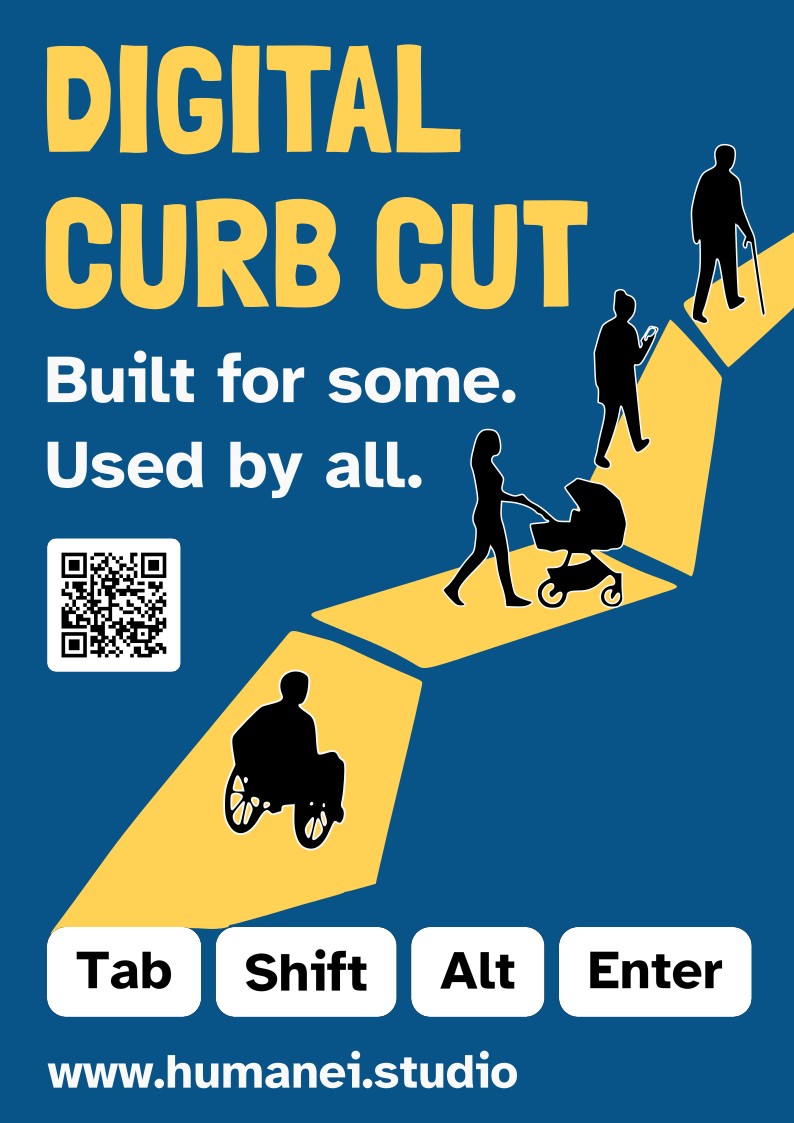
A poster about ramps for the web: built for some people, used by everyone.
Contrast ratio
Every colour pairing on the poster was chosen for its contrast, not just its mood. Higher numbers are easier to read.
| Pairing | Ratio | What it means | WCAG |
|---|---|---|---|
| White words on blue | about 8:1 | Easy to read. | AAA |
| Yellow words on blue | about 5.5:1 | Still clear, and it feels bright and loud. | AA |
| Black people on yellow | about 14.5:1 | Very easy to see. | AAA |
| Black words on white keys | 21:1 | The maximum possible. | AAA |
WCAG 2.2 asks for at least 4.5:1 for normal text (AA) and 7:1 for the stricter AAA level.
Why this helps people with low vision
Some people see the world a bit blurry or dim, like looking through foggy glasses. For them, colours that are only slightly different melt together. Big differences between colours stay visible even when everything is blurry.
That is why the poster uses dark blue with bright yellow and white, instead of soft colours.
Every choice has a reason
-
The fonts
The title is thick, chunky and big. Fat letters carry more colour, so they are easier to spot from far away, and they look hand-cut, like paper shapes. The subtitle is a plain, bold font with simple letters and no fancy squiggles, so nothing gets confused with something else.
-
The keyboard keys
Tab, Shift, Alt and Enter are real keys. Some people cannot use a mouse, so they move around websites with these keys instead. Putting them at the bottom says: this poster is about the digital world. They are white with black letters, the clearest combination there is.
-
The ramp
A curb cut is the sloped part of a pavement that lets wheelchairs cross the street. But look who else uses it: prams, suitcases, bikes and scooters. It was made for some people, and everyone uses it. The yellow path is that ramp, and it grows out of the keyboard because websites can have ramps too.
-
The silhouettes
Black shapes without faces, so anyone can imagine themselves in them. You can tell who they are from their shapes: a wheelchair, a cane, a phone and a pram. The thin white edge works like a sticker outline, so they do not melt into the dark blue.
-
The website link
It is written in big letters, because words work for everyone. Someone who cannot scan a code can still read it, or have a screen magnifier or a helper read it out.
-
The QR code
A shortcut for people with phones: point the camera and the website opens, no typing. It sits on a white square with a white border, because cameras need clear space around a code to read it, a bit like needing a clean page to read a word.
-
The empty space
Empty space is like the quiet moments in a song. If every spot were full, your eyes would not know where to look. The blue gaps let the title, the people and the key words stand out, and make the poster feel calm and easy to understand.
How the eye travels
- Your eyes start at the big yellow title at the top left.
- They slide down to the white subtitle.
- The yellow path pulls them diagonally, from the keys
at the bottom up to the top right, like climbing a staircase. - The people shrink as they go up, which makes the path
look long. - Everything lines up on the same left edge, like books on a shelf, so it looks tidy.
Accessibility works best when it is built in from the start. Want a ramp on your website?
What made you smile today?
Share anonymously — every moment becomes part of a living wall of human experience.