The internet
should feel human.
Designing digital experiences that are accessible, inclusive, and emotionally respectful for everyone, especially those the web has historically overlooked.
Most accessibility work focuses on compliance. HumanEI goes further: I design so that people feel seen, understood, capable, and included not confused, excluded, or exhausted.
Why HumanEI exists
Protect the heart — the most vital organ
Real people are not ideal users. People are tired, distracted, visually impaired, dyslexic, anxious, ageing, or simply having a difficult day. The web was built ignoring those realities. HumanEI is built around them.
WHY
Because everyone deserves digital dignity
I believe the internet should feel human accessible, understandable, and emotionally safe for everyone, especially those it has historically overlooked.
HOW
Design + WCAG, layered with human experience
Combining accessibility standards with empathetic design thinking. Compliance gets you to the door. Human-centred design invites people inside.
WHAT
Accessible, inclusive digital experiences
UX/UI design, WCAG-aligned websites, accessible design systems, and inclusive interfaces built for the reality that every human experiences limitation.
Every human deserves dignity, online
Room to expand the dignity of every human
Dignity online looks like being able to finish a form without help. Hearing a page read back clearly. Reading a sentence once and understanding it. None of that is a stretch goal, it’s the baseline HumanEI designs to.
Compliance is the floor, not the ceiling
The backbone — WCAG as foundation, not ceiling
Most accessibility work stops at the checklist. I start there and go further and I build toward where the standards are heading, not just where they are today.
⬜ Typical accessibility approach
- Compliance-first mentality
- Technical, jargon-heavy reports
- Checklist mentality — tick and move on
- Reactive fixes after launch
- Ignores emotional experience
- Treats disabled users as edge cases
💛 The HumanEI approach
- Human-first, always
- Plain language, actionable feedback
- WCAG 2.2 AA as a foundation — WCAG 3.0-ready by design
- Accessibility baked in from day one
- Emotional clarity woven through design
- Real people at the centre of every decision
Walk in someone else’s shoes
Shield what’s vulnerable — walk in their shoes
Experience the web as others do. Activate any mode to feel it.
Low Vision
Reduced clarity and increased contrast needs.
Colour Blindness
Protanopia — how colour-only cues disappear.
Dyslexia View
Adjusted typography and spacing for readability.
Cognitive Load
Reduce visual complexity for cognitive access.
Keyboard-Only
Try navigating this page without touching the mouse.
Screen Reader
Hear the page read aloud by speech synthesis.
Logic and feeling, unified
Left meets right — logic and feeling, unified
Good accessibility work is never just technical or just emotional. It’s both, working together the same way the left and right hold up a single mind.
Structured thinking
WCAG success criteria, semantic markup, keyboard logic, contrast ratios. The measurable, testable side of accessibility the part an auditor can check off.
Felt experience
Whether a page feels calm or overwhelming. Whether error messages sound kind or cold. The side of accessibility that a checklist can’t capture, but every user notices.
Services built around real people
True ribs — directly attached, deeply committed
Accessibility Audits
Find barriers before your users do. Audits go beyond automated tools tested against WCAG 2.2, with reports written in language your whole team understands.
- WCAG 2.2 AA + AAA review
- Keyboard and screen reader testing
- Prioritised remediation roadmap
- Plain-language reporting
Inclusive UX Design
Accessibility built in from day one, not retrofitted after launch. Inclusive design thinking embedded into every stage of your product or website.
- Accessible design systems
- Focus states and interaction patterns
- Cognitive load reduction
- Inclusive content and microcopy
Accessible Design Workshops
Practical sessions for design and development teams hands-on, jargon-free, and grounded in real WCAG 2.2 examples that show what difference inclusive design makes.
- Half-day and full-day formats
- Empathy simulation exercises
- Practical WCAG walkthroughs
- Follow-up support available
Accessibility tools, built for real people
False ribs — connected to all, owned by none
Practical tools you can use right now — no login, no jargon.
Image Describer
Upload any image and receive a detailed alt text description, a long description, and a social-ready caption instantly.
Try it free →Caption Generator
Generate accurate, accessible captions for video and audio content in seconds.
Try it free →Transcript Generator
Convert any audio recording into a clean, downloadable transcript with speaker identification.
Try it free →Accessibility Checker
Run a WCAG 2.2 scan on any URL and get a clear, prioritised action list — not just a list of errors.
Try it free →Plain Language Converter
Paste any complex content and get a plain English version — clear, respectful, and readable for everyone.
Try it free →Emotional Tone Checker
Analyse whether your content feels inclusive, respectful, and human — not just readable. Our signature tool.
Try it free →Floating — free, unanchored, undeniable
People worldwide live with some form of disability. But accessible design helps everyone — not just those who identify as disabled.
Captions help far more than you think
85% of social videos are watched on mute. Captions serve commuters, non-native speakers, focus-challenged users, and people in noisy environments — not only deaf users.
Contrast benefits ageing eyes
The global population is ageing. Good colour contrast, clear type, and readable layouts are simply good design for a longer lived audience.
Plain language works for everyone
Writing for cognitive accessibility makes content clearer for everyone — including experts who are tired and just need a straight answer.
What people actually say
Absorb impact — protection under pressure
“For the first time I could complete the entire process without asking for help. That independence meant everything.”
Screen reader user, e-government service
“The content felt genuinely clear and welcoming not like it was written by lawyers trying to cover themselves.”
User with cognitive disability, financial services
“Accessibility stopped feeling like a checklist. Our whole team finally understood why it matters to real people.”
Head of Product, SaaS company
What made you smile today?
Breathe out — release, share, be human
Not marketing. Just a reminder that accessibility is about real people.
This website is built to the standard I help others achieve
The last rib — the foundation everything rests on
HumanEI holds itself to the same standard it advocates for. This site is built with these commitments:
- WCAG 2.2 AA
- Keyboard Navigation
- Screen Reader Compatible
- Captions & Transcripts
- Plain Language
- Reduced Motion Support
- High Contrast Available
WCAG 3.0 is still a W3C Working Draft, not yet a final standard — expected sometime after 2028. It replaces A/AA/AAA with Bronze, Silver, and Gold outcome-based levels. Meeting WCAG 2.2 AA today, as this site does, already forms the foundation of WCAG 3.0’s Bronze tier.
Every human deserves access.
Let’s create digital experiences people can use, understand, and genuinely enjoy.
Free guides and resources
Accessibility Guides
Practical, plain-language guides for every experience level.
Inclusive UX Articles
Deep dives into inclusive design patterns and real-world examples.
WCAG 2.2 Explained Simply
No jargon. Just what each criterion means in plain human terms.
Downloadable Checklists
Practical audit and design checklists your team can use today.
Colour Contrast Checker
Test any colour combination against WCAG 2.2 contrast requirements instantly.
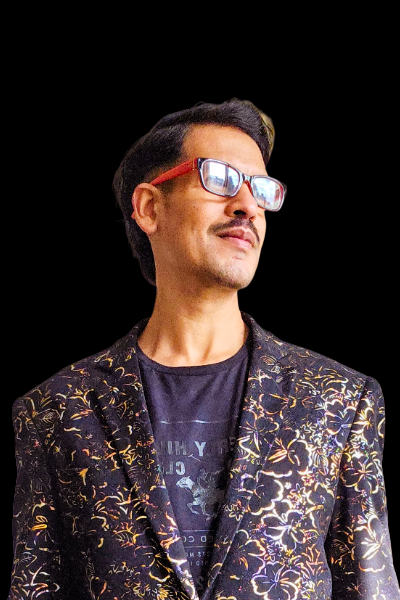
A designer who believes the web should work for everyone
A few years ago, I started a graphic design course. I had spent years as a dockhand and warehouse worker, lifting boxes and sorting mail. On the first day I didn’t know how to switch on a Mac, and I nearly quit. I stayed, and I haven’t forgotten what it feels like when technology isn’t built for you. That’s why I design for everyone.
Most digital experiences are built for speed, trends, and an imagined “ideal user.” But real people are tired, distracted, visually impaired, dyslexic, anxious, ageing, or simply having a difficult day. The internet rarely designs for those realities. I do.
My work asks three questions at every step:
- Can this be perceived and used? (WCAG 2.2)
- Can this be understood easily, without confusion or stress?
- Does this feel welcoming, respectful, and genuinely human?
That combination — accessibility standards layered with real human consideration is what HumanEI is built on.
Work With MeLet’s make something accessible
Whether you need an audit, a redesign, a workshop, or just want to talk through where to start — I’d love to hear from you.
Start a project or say hello
I’ll get back to you within 2 working days.
Please enter your name.
Please enter a valid email address.
Please tell me a little about your project.
What made you smile today?
Share anonymously — every moment becomes part of a living wall of human experience.